

Angular 22 Is Here, And It’s Not the Angular You Remembered
Angular 22 marks a major evolution of the framework with Signals, Zoneless Angular, Signal Forms, httpResource, and AI-ready development. In this article, explore 12 of the most impactful features shaping modern Angular development, complete with practical examples and code snippets.
We're in 2026, and AI is moving at a speed that's honestly hard to keep up with. Every week there's a new model, a new tool, a new workflow. And because of that pressure, programming languages and frameworks are also leveling up faster than ever—trying to stay relevant, adopt AI-friendly patterns, and squeeze out more performance.
Most of us developers have been heads-down in AI topics—LLMs, prompt engineering, vector databases, AI agents, MCPs... and honestly, fair enough.
But here's the thing—while we were busy with all that, Angular quietly had a glow-up.
I recently sat down to explore Angular again—my favourite framework—mostly out of curiosity. And the first thing that hit me was:
Angular 22. Already?
Let that sink in.
Angular went from version 14 to version 22 in just about two years. That's roughly one major release every six months. They've been shipping like a startup, not a mature framework.
And this isn't just version bumping.
Every release brought meaningful improvements. Features that were labeled Developer Preview or Beta just a release or two ago are now stable, polished, and production-ready.
So if your last memory of Angular is ngOnChanges, Zone.js, and @Input() decorators everywhere...
Buckle up. This is a completely different Angular.
Angular's Evolution at a Glance
Looking at the release history really puts things into perspective.
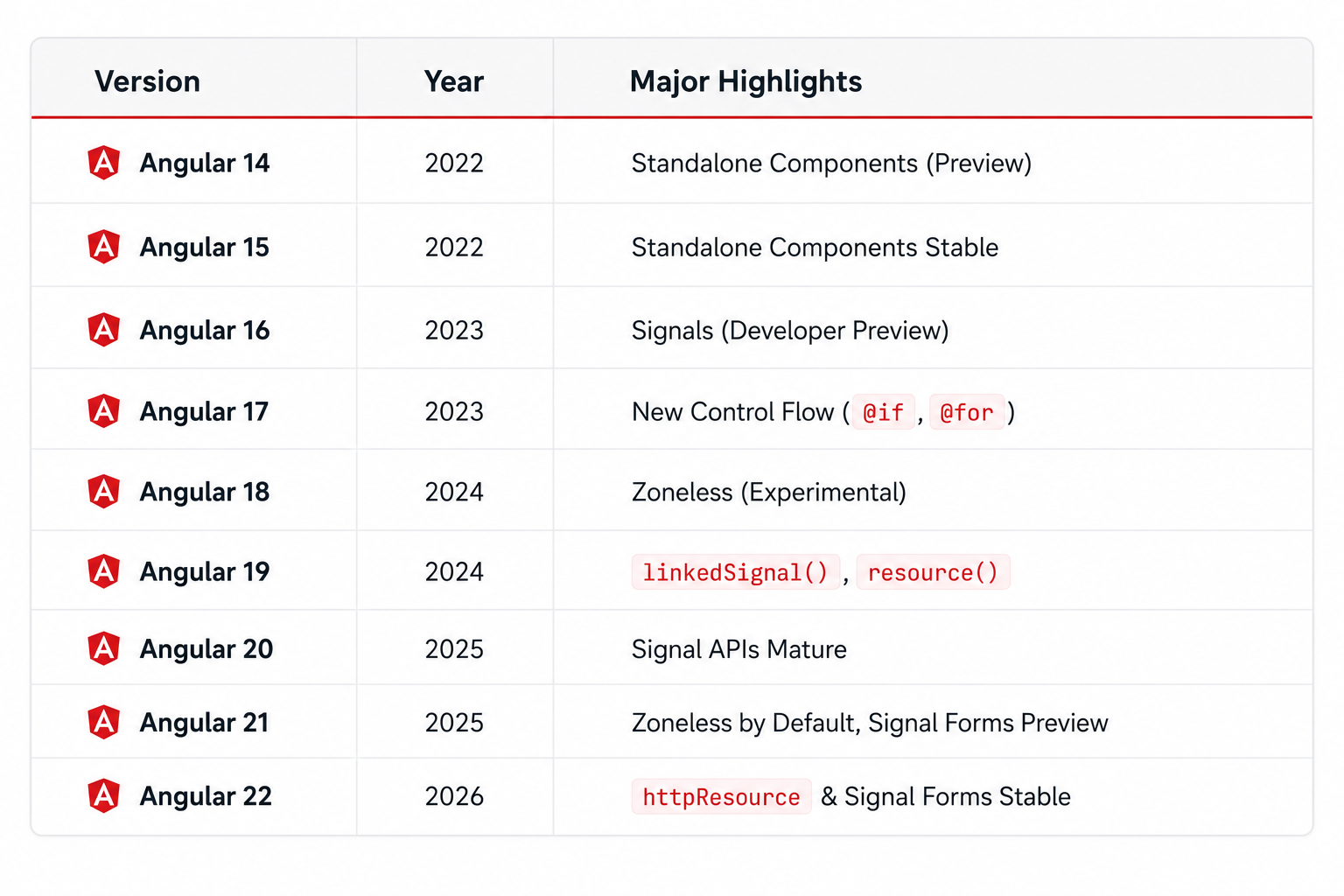
That's eight major releases in roughly four years, with the biggest architectural changes happening over the last two.
The Angular team isn't maintaining a legacy framework anymore. They're actively rebuilding the developer experience—piece by piece.
The coolest part?
Many of the features introduced as experimental over the last few releases have now matured into stable APIs that are ready for production. Let's look at what changed.
Goodbye Zone.js — Hello Zoneless Angular
If you worked with Angular a few years ago, you've definitely heard about Zone.js.
You may have used it for years without fully understanding what it actually did—and honestly, that was part of the problem.
Behind the scenes, Angular needed a way to know when your application state changed so it could update the UI.
JavaScript doesn't naturally announce:
"Hey! Something changed."
To solve this, Angular relied on Zone.js, a library that monkey-patched browser APIs like:
setTimeout()setInterval()fetch()Promise
Whenever one of these asynchronous operations completed, Zone.js would notify Angular, which then triggered change detection.
It worked. But it came with a cost.
But it came with several downsides.
- Additional bundle size
- More work during every asynchronous operation
- Change detection even when nothing changed
- Performance overhead
- Hidden framework magic that made debugging difficult
Starting with Angular 21, Zone.js is no longer enabled by default.
Instead, Signals tell Angular exactly what changed and when.
No guessing. No checking the entire component tree. Just precise updates.
Your app.config.ts now looks like this:
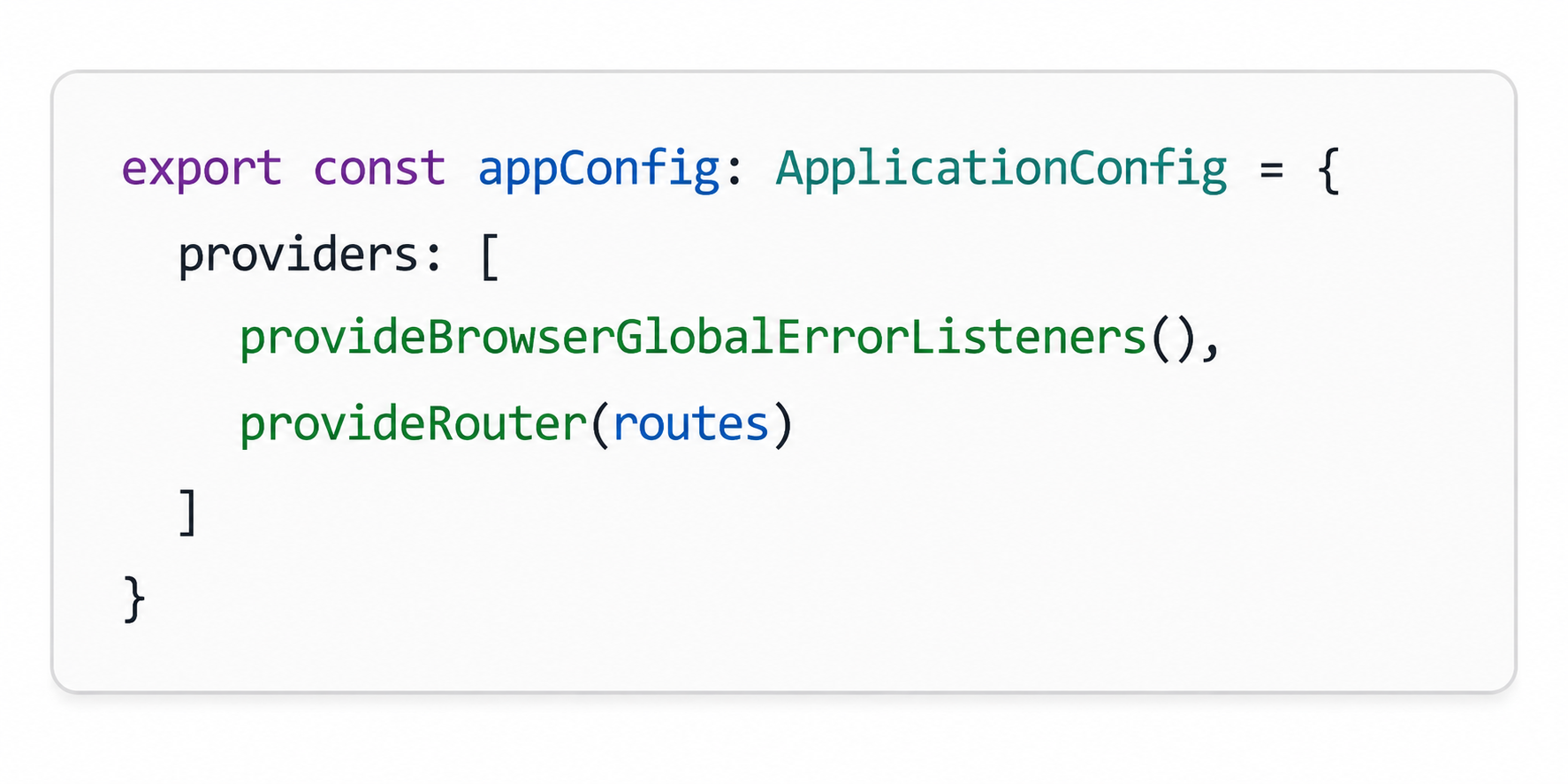
Notice what's missing?
No provideZoneChangeDetection().
No Zone.js configuration.
No Zone.js import inside polyfills.ts.
It's simply gone.
Why this matters?
Angular now performs change detection only where it's needed, resulting in smaller bundles and better runtime performance.
Wait... If Zone.js Is Gone, Do Lifecycle Hooks Still Work?
When I first learned that Zone.js was gone, my immediate thought was:
"So... does that mean lifecycle hooks are gone too?"
ngOnInitngOnChangesngAfterViewInitngOnDestroy
Thankfully...
No.
This is one of the biggest misconceptions about modern Angular. Zone.js and lifecycle hooks were never responsible for the same thing.
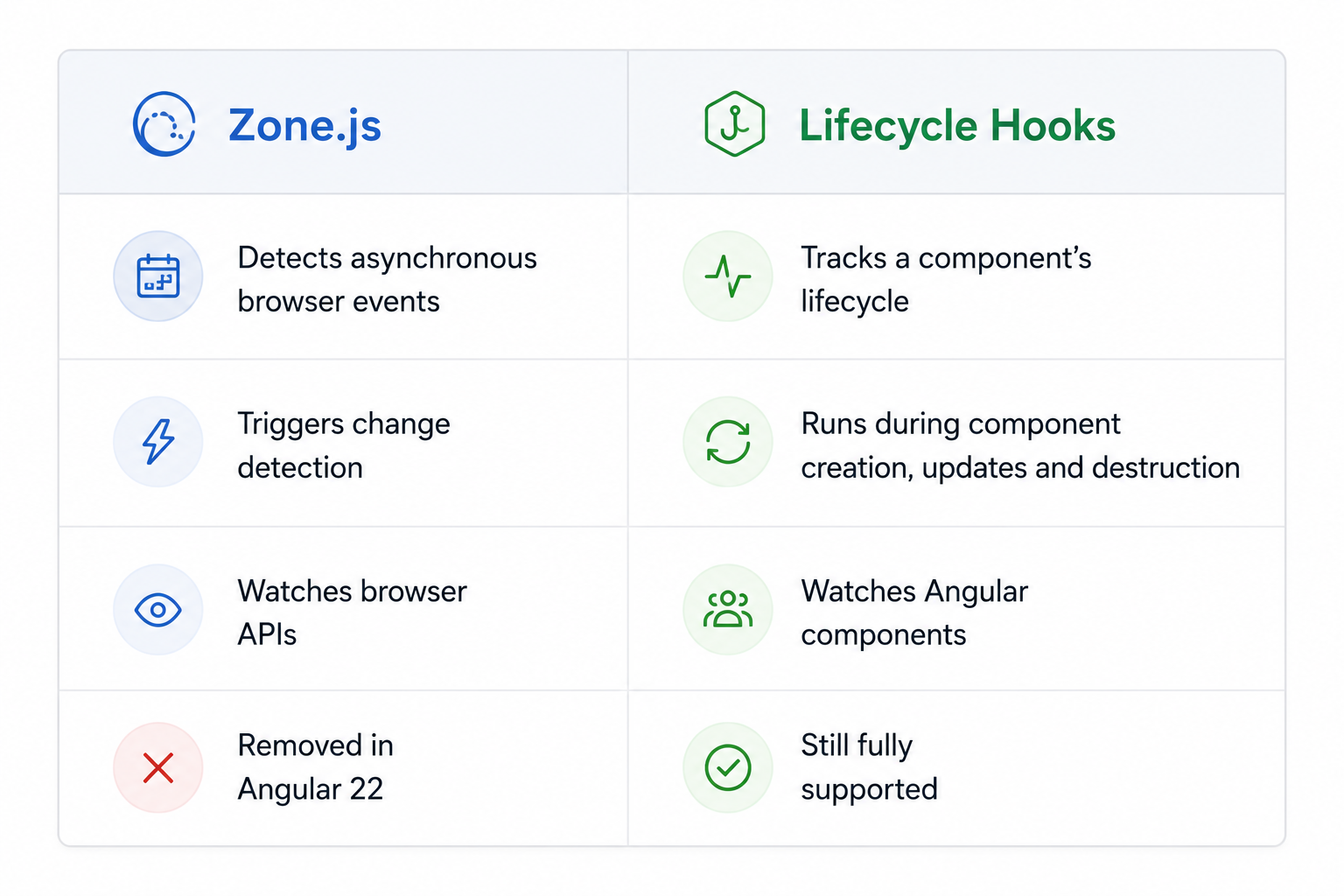
Zone.js simply acted as the trigger that told Angular:
"Something asynchronous happened. Go check the UI."
Lifecycle hooks, on the other hand, are part of Angular's component lifecycle and continue to work exactly as before.
That means all of these are still available:
ngOnInit()ngOnChanges()ngAfterContentInit()ngAfterViewInit()ngOnDestroy()
The real architectural shift is this:
Old Angular

Modern Angular

That's a huge difference.
Signals — The New Reactive Core of Angular
If there's one feature that defines modern Angular, it's Signals.
Think of a Signal as a smart variable.
It stores a value, but unlike a normal variable, Angular automatically tracks when that value changes.
Creating a signal is straightforward:
searchTerm = signal('');
Updating it is equally simple.
this.searchTerm.set('apple');
Reading a Signal looks slightly different.
console.log(this.searchTerm());
That pair of parentheses (()) is more than syntax.
Whenever Angular sees a component read a signal like this:
this.searchTerm()
it automatically records the dependency.
Later, if that signal changes, Angular knows exactly which components depend on it and updates only those components.
No subscriptions. No manual change detection. No unnecessary rendering.
From @Input() to input()
Another major improvement is the move away from decorator-based inputs.
Traditional Angular
@Input()
userId: number = 0;
Angular 22
userId = input<number>();
Or, when the input is mandatory:
userId = input.required<number>();
The new input() API returns a read-only Signal.
The parent component owns the value. The child simply reacts to changes. It's cleaner, more explicit, and fits naturally into Angular's signal-first architecture.
Why This Matters
Signals reduce boilerplate, improve performance, and make Angular's reactivity much easier to reason about. Instead of manually managing updates, developers simply declare relationships and Angular handles the rest.
At this point, Angular already feels very different from the framework many of us learned a few years ago.
And we're only getting started.
In the next section, we'll explore how Angular is making templates cleaner with @let, simplifying derived state with computed() and linkedSignal(), and introducing new reactive APIs that dramatically reduce boilerplate.
@let — Template Variables That Actually Make Sense
One of the smaller additions in Angular 22 turned out to be one of my favourites. Angular now supports @let, which lets you declare local variables directly inside your template. At first glance, it might not seem like a big deal. But once you start using it, you'll wonder how you managed without it.
Imagine you have a user object coming from an async pipe or a signal, and you need to use it multiple times throughout your template.
Without @let, you end up repeating the same expression everywhere.
Before @let
@if (user$ | async) {
<h1>{{ (user$ | async)?.name }}</h1>
<img [src]="(user$ | async)?photo" />
<p>{{ (user$ | async)?.bio }}</p>
}
The same expression is evaluated multiple times, making the template noisy and harder to read.
With @let, things become much cleaner.
With @let
@let user = user$ | async;
@if (user) {
<h1>{{ user.name }}</h1>
<img [src]="user.photo" />
<p>{{ user.bio }}</p>
}
Now you declare the value once and reuse it everywhere within that scope.
The variable is automatically updated whenever Angular re-evaluates the template.
A Few Simple Rules
- Declare it before using it.
- It's scoped to the current block (and nested blocks).
- Expressions can span multiple lines.
- Just like JavaScript's
let, each variable has its own scope.
computed() and linkedSignal() — Derived State Without the Boilerplate
Signals are great for storing state. But real applications rarely display raw data.
We usually need filtered lists, calculated values, formatted text, totals, selected items, and more.
Angular provides two APIs for this:
computed()linkedSignal()
Although they sound similar, they solve different problems.
computed() — Automatically Derived Values
Suppose you have a list of items and a search box.
Every time the search term changes, the filtered list should update automatically.
Here's how Angular handles it.

Whenever either of these signals changes:
searchTerm_items
Angular automatically recalculates filteredItems.
No event listeners. No subscriptions. No manual updates.
Simply read it like any other signal.
this.filteredItems();
One Important Rule
computed() is read-only.
You can read its value. You cannot update it.
For example:
filteredItems.set(...); // ❌ Not allowed
That's intentional.
A computed signal should always derive its value from other signals—not from manual updates.
linkedSignal() — Writable Derived State
Sometimes you want a value that's derived from another signal but still editable.
A common example is a product size selector.
You want the first size selected automatically.
But once the user picks another size, their choice should be respected.
That's exactly what linkedSignal() solves.

Initially:
Small
If the user changes it:
this.selectedSize.set('Large');
Everything works as expected.
Now imagine the available sizes change
sizes.set([
'XS',
'S',
'M'
]);
Angular automatically resets the default selection to the first value in the new list.
No additional logic required.
computed() vs linkedSignal()

computed()removes manual calculations, whilelinkedSignal()solves a surprisingly common UI problem—editable defaults that stay synchronized with changing data.
effect() — Reacting to Changes Without Subscriptions
computed() creates new values. But sometimes you don't need another value. You simply want something to happen when a signal changes. That's where effect() comes in.
Here's a simple example.

Whenever theme changes, Angular automatically reruns the effect.
No subscriptions.
No ngOnChanges().
No manual wiring.
You simply declare the relationship.
Angular takes care of the rest.
Common Use Cases
effect() is ideal for situations where you're interacting with something outside Angular's reactive system.
For example:
- Saving preferences to Local Storage
- Sending analytics events
- Logging values during development
- Updating third-party chart libraries
- Syncing with browser APIs
Think of it as Angular's way of saying:
"Whenever this signal changes, perform this side effect."
One Rule You Should Never Break
Avoid updating the same signal inside an effect(). This creates an infinite loop.
effect(() => {
this.count.set(
this.count() + 1
);
});
Why?
The effect reads count. Updating count triggers the effect again. Which updates count again.
And again.
And again...
Instead, use:
computed()for deriving valueseffect()for interacting with the outside world
That's the intended separation of responsibilities.
Cleaning Up Effects
Sometimes an effect creates resources that need to be cleaned up.
For example:
- Timers
- Event listeners
- Third-party subscriptions
Angular provides an elegant solution through onCleanup().
effect((onCleanup) => {
const timer = setInterval(() => {
console.log(this.count());
}, 1000);
onCleanup(() => {
clearInterval(timer);
});
});
Whenever the effect reruns—or the component is destroyed—Angular automatically calls the cleanup function.
No memory leaks. No forgotten timers. Just predictable lifecycle management.
Debounced Signals — Smarter Search with Less Code
A common challenge in web applications is avoiding unnecessary API calls while users are typing.
Previously, Angular developers relied on RxJS operators like debounceTime(). Angular now provides a native Signal-based solution with debounced().
import { debounced } from '@angular/core';
query = signal('');
debouncedQuery = debounced(this.query, 300);
The debounced signal waits for 300ms of inactivity before updating, making it ideal for search, auto-save, and live filtering.
It works seamlessly with httpResource.
query = signal('');
debouncedQuery = debounced(this.query, 300);
results = httpResource<Product[]>(() =>
`https://api.example.com/search?q=${this.debouncedQuery.value()}`
);
The result is a completely reactive search flow with no manual timers or subscriptions.
httpResource — Reactive Data Fetching Made Simple
Fetching data has traditionally involved managing loading states, errors, subscriptions, and cleanup manually.
Angular 22 simplifies this dramatically with httpResource.
import { httpResource } from '@angular/common/http';
users = httpResource<User[]>(
'https://api.example.com/users'
);
This single line automatically provides reactive signals for:
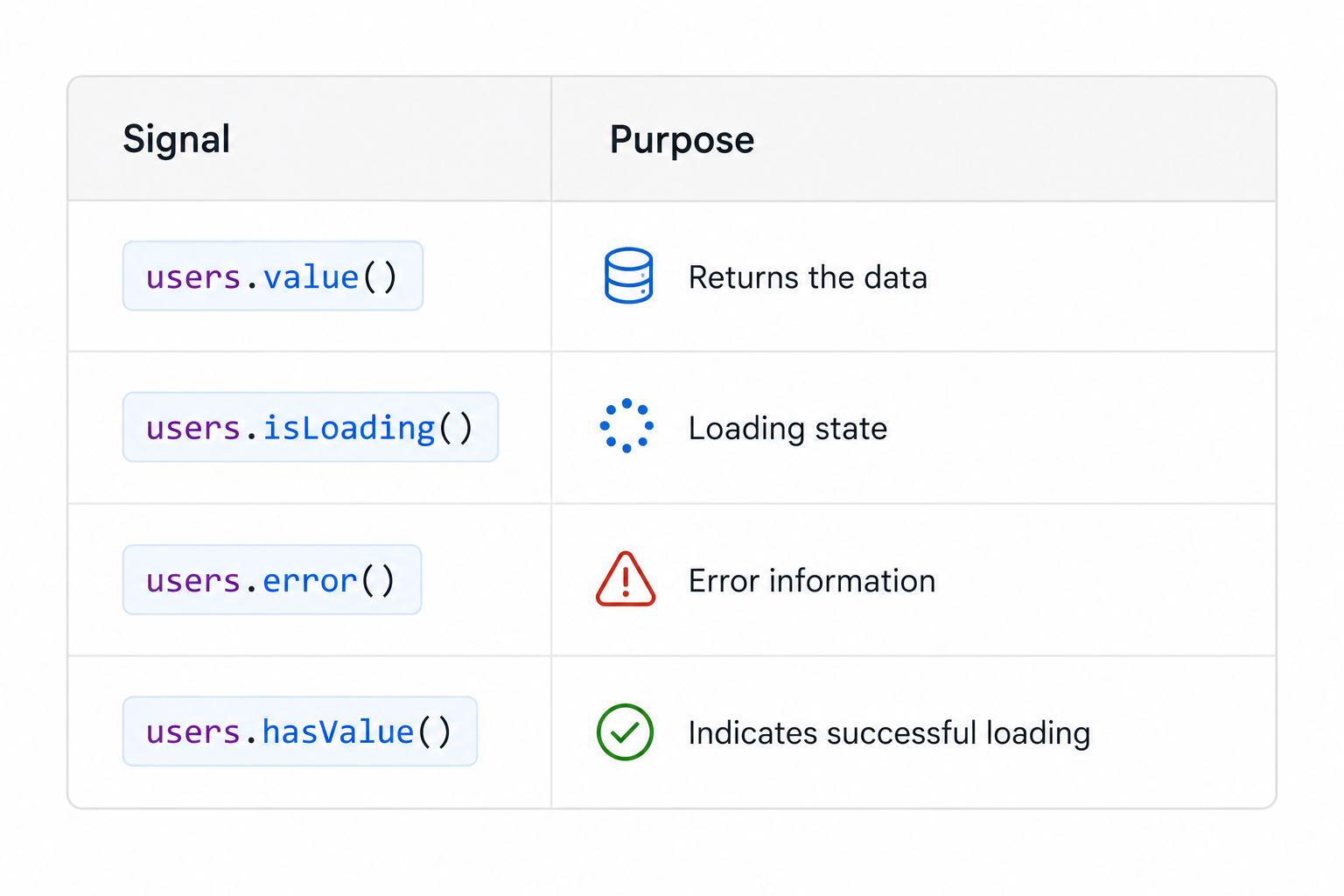
Rendering different states becomes straightforward.
@if (users.isLoading()) {
<p>Loading users...</p>
}
@if (users.error()) {
<p>Something went wrong.</p>
}
@if (users.hasValue()) {
@for (user of users.value(); track user.id) {
<div>{{ user.name }}</div>
}
}
It also reacts automatically when the request depends on another Signal.
userId = input.required<number>();
userDetail = httpResource<User>(() =>
`https://api.example.com/users/${this.userId()}`
);
Whenever userId changes, Angular automatically fetches fresh data.
For POST, PUT, and DELETE operations, HttpClient remains the recommended choice.
Signal Forms — Forms That Feel Like Signals
Forms are now part of Angular's Signal-first architecture.
Instead of managing FormGroup, FormControl, and multiple subscriptions, you can build reactive forms using Signals.
import { signalForm, signalInput } from '@angular/forms';
form = signalForm({
name: signalInput(''),
email: signalInput(''),
age: signalInput(0)
});
Every part of the form—values, validation, dirty state, and touched state—is exposed as a Signal.
<input
[value]="form.controls.name.value()"
(input)="form.controls.name.set($event.target.value)"
/>
@if (!form.valid()) {
<p>Please fill in all required fields.</p>
}
No valueChanges. No subscriptions. Just a consistent reactive programming model throughout the application.
Lazy Loading Gets Even Better
Angular has made lazy loading simpler than ever with Standalone Components.
Instead of configuring modules, you can lazy load a component directly using loadComponent().
export const routes: Routes = [
{
path: 'dashboard',
loadComponent: () =>
import('./pages/dashboard/dashboard.component'),
},
{
path: 'settings',
loadComponent: () =>
import('./pages/settings/settings.component'),
}
];
Angular also introduces @defer, allowing components to load only when they're actually needed.
@defer (on viewport) {
<heavy-chart-component />
} @placeholder {
<p>Loading chart...</p>
}
This helps reduce the initial bundle size and improves page load performance, especially for large applications.
Angular Is Built for the AI Era
One of the most surprising additions in Angular 22 appears before you even write your first line of code.
When creating a new project with ng new, Angular now asks which AI coding assistant you use.
? Which AI coding assistant do you use?
❯ None
GitHub Copilot
Cursor
Windsurf
Other
Based on your selection, Angular automatically generates assistant-specific instruction files.
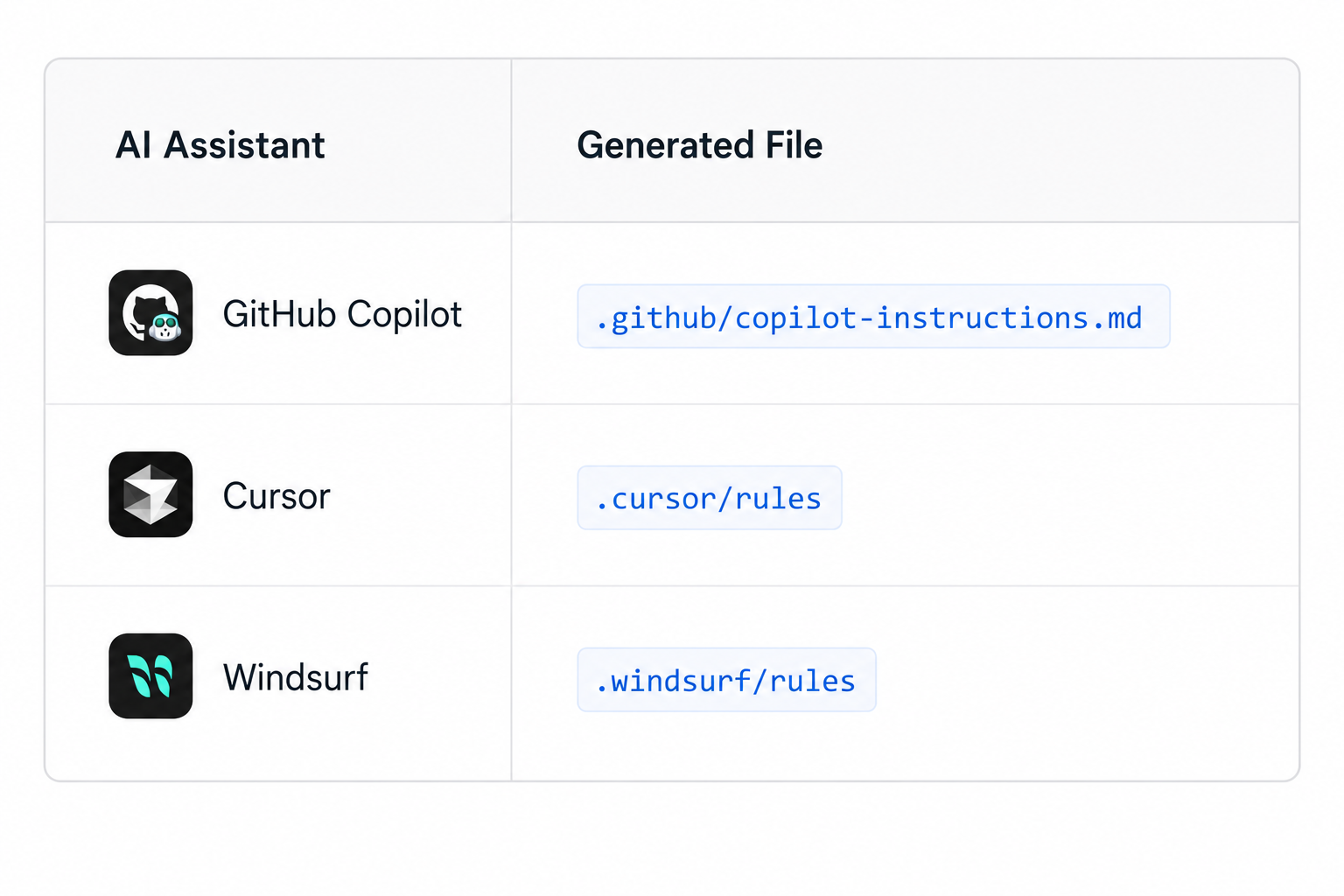
These files guide AI tools to generate modern Angular code using:
- Signal-based APIs
- Standalone Components
httpResource- Modern Angular best practices
Combined with the built-in AI assistant on angular.dev, Angular is clearly embracing AI-assisted development rather than treating it as an afterthought.
The Bigger Picture
Looking back at everything we've covered, it's clear these aren't isolated features.
- Zoneless Angular
- Signals
@letcomputed()linkedSignal()effect()debounced()httpResource- Signal Forms
- Lazy Loading
- AI integration
They're all moving Angular in the same direction.
Make reactivity the default—not something developers have to configure.
The result is a framework that's:
- Faster
- Easier to understand
- Less verbose
- More predictable
- Better suited for AI-assisted development
Angular hasn't abandoned its strengths—it has refined them.
Final Thoughts
Angular 22 doesn't feel like a routine version update.
It feels like the framework has finally completed the transition it started with Standalone Components and Signals.
The APIs are more explicit, the developer experience is cleaner, and the framework no longer relies on hidden magic to keep applications reactive.
If you stepped away from Angular a few years ago, now is a great time to take another look.
And if you're learning Angular today, you're starting with the version the community has been moving toward for years.
The framework has evolved. Now it's our turn to evolve with it.
Enjoyed the article?
If you found this helpful, share it with someone who still thinks Angular is the framework they used five years ago.
They might be surprised.